Your first plan
Plan mode keeps the session read-only while the model investigates, then hands you a plan to approve. This walkthrough takes one change from “start” to “approved and running”.
You need Pi and this package installed — see Install.
Start with the change
/plan add rate limiting to the public API
/plan with a line after it enters plan mode and sends that line as the task, so
the first turn already runs read-only. Without bytefly, bare /plan toggles the
mode; with bytefly loaded, Shift+Tab does the same from the editor.
What “read-only” means while you are here: the model keeps its readers and loses
its writers. git status, diff, log, and show still work; a write, an edit,
and a shell redirect are refused. Reads are not confined to the project, and a
delegated agent runs with writing forced off.
Read the plan
The model investigates, then saves the plan file:
plan write Add rate limiting
✓ Saved plan ~/.pi/agent/plans/a1f9c02b3d4e/2026-10-09-1809-add-rate-limiting.md
plan exit is what opens the review screen on that file. On the screen: n/p
jump between sections, the usual scroll keys move through the body, and the footer
lists only the keys that apply. A plan you refined since the last look marks just
the sections that changed.
| Key | What it does |
|---|---|
a |
approve: plan mode ends, write access returns, the steps become your todo list |
r |
refine: edit the plan inline, then Enter sends it back to the model |
Esc |
keep planning: nothing is approved, the model is told to keep going |
x |
leave plan mode without approving; the plan file stays for later |
w |
open the same plan in your browser to comment on it |
Approve it
a asks once, naming what the answer does — plan mode off and how many steps it
seeds into todo — and y or Enter confirms. Your task list gains the plan’s
steps in order, appended after anything already on it and with the verification
item last; on an empty list they are the whole list. A session goal you had left
as a draft is finalized from the plan’s ## Goal, without another dialog.
From here the model executes the plan it wrote; plan steps ticks a step in the
file and in your todo list together.
Comment in the browser
w opens the review page on 127.0.0.1. Hover a block and press the + in its
margin, or select text first to quote it; Save feedback writes the comments
into the plan file and returns them to the model as review notes.
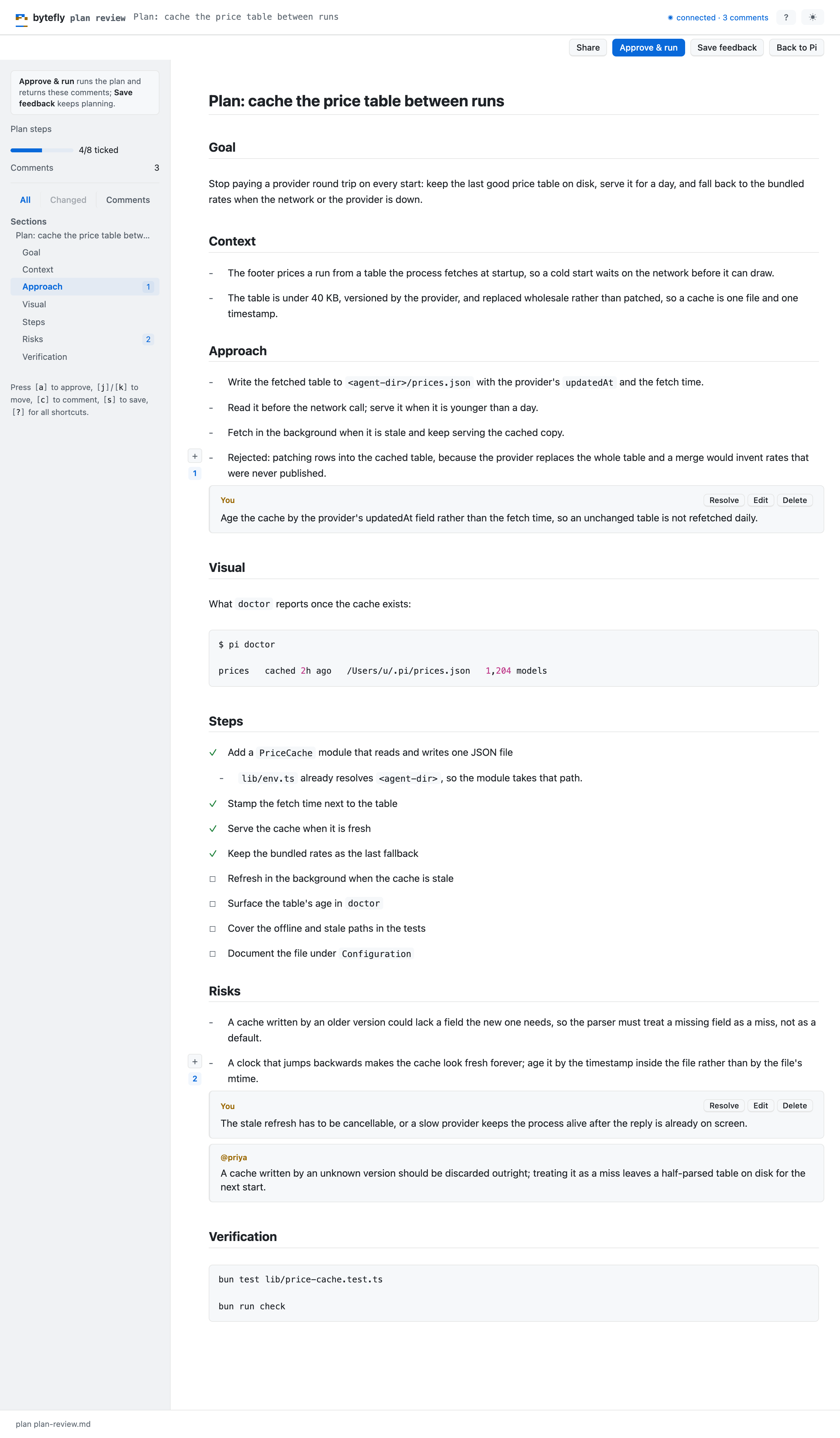
The review page: the plan’s sections in the rail, the comments in the margin, and the approval at the top.
For a teammate, Share prints a reviewer link and a QR code a phone can scan. Each person gets a link of their own (New link), a reviewer’s first post binds her name to that link, and Revoke drops one link without touching the rest. Only the machine that opened the review may approve; a reviewer reads and comments.
Refine and approve again
If the review changes your mind, r refines — the model rewrites the same plan
file, the previous text is kept beside it, and only the sections that moved are
marked on the next review. Approving again replaces the todo items the earlier
approval added that nobody has started, so the list matches the plan you last
approved.
Read a plan later
/plan list
The list shows every saved plan with its title, when it last changed, and its
step progress, newest first; Enter opens one in the browser to read. Plans live under
~/.pi/agent/plans/<repo-key>/, so every worktree of a repository shares the same
store.