rewind — go back to an earlier prompt
rewind snapshots your working tree before each prompt’s first change, so a bad
turn is one screen away. From the timeline you choose a prompt and restore the
code, the conversation, or both.
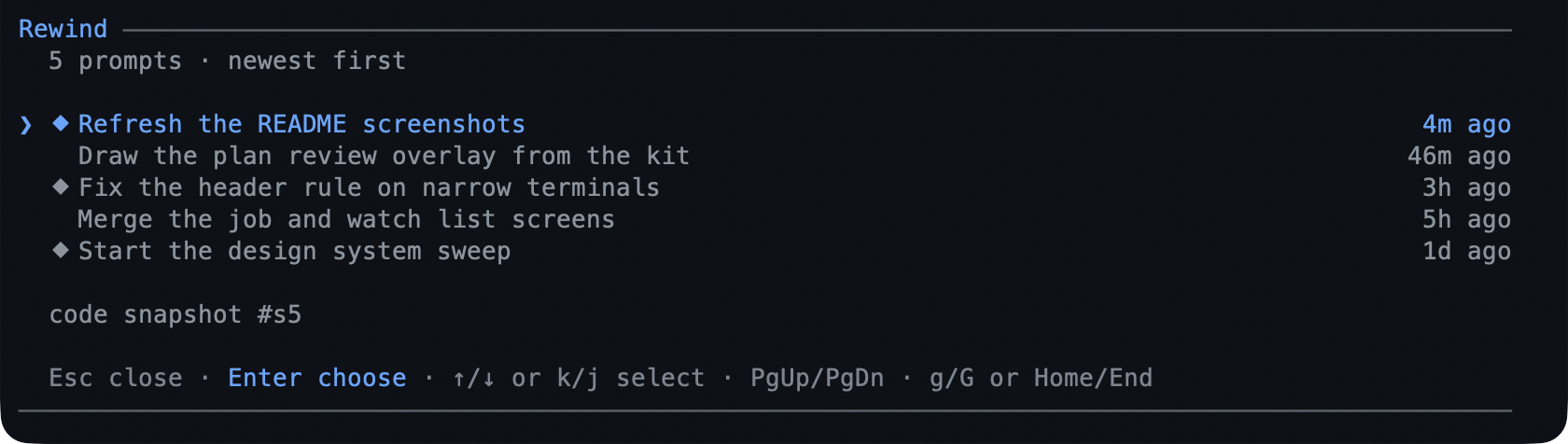
- Automatic. One snapshot per prompt, taken before anything is written.
- Git refs, not stashes. Snapshots live under
refs/pi/rewind, so restoring one never movesHEADor touches your index. - A restore is undoable: the state it replaces is snapshotted first.
- The branch you leave stays — a conversation rewind moves the session tree and puts the prompt text back in the editor.
What you can do
| What you want | What to do |
|---|---|
| Go back to an earlier prompt | /rewind, pick the prompt, then the scope |
| Restore files only | Code only |
| Restore the conversation only | Conversation only |
| Restore one directory, not everything | Choose paths… in the second step |
| Undo a restore | /rewind again — the pre-restore state is a snapshot |
| See which prompts have a snapshot | the ⬥ beside a timeline row |
| Know how many prompts the branch has | the ↺ N chip in the status bar |
| Stop snapshots for a while | rewind.autoSnapshots: false |
Try it
/rewind
↑/↓ or j/k move, PgUp/PgDn/Home/End jump, and Enter picks the
focused prompt. The screen closes, then asks what to restore; a code restore with
several changed paths asks Everything (N files) or Choose paths…, and the
checklist takes Space per file, a/n for all or none, and Enter to confirm.
A confirmation with the diff preview is the last step.
Go back to an earlier prompt walks a code restore,
a conversation restore, and the undo.
Reference
The command. /rewind is the only command; it prints the prompt list instead
of a picker in print/json runs, and falls back to Pi’s own select in RPC.
What a snapshot captures. Tracked files plus untracked files that git does not
ignore, with the tree’s content as it was before the prompt’s first mutating
call. Files matched by .gitignore are never captured.
Where they live. refs/pi/rewind/<id>, one ref per snapshot, listed from git
rather than from session state — so they survive the session and worktrees share
the store while another root’s snapshots are filtered out and refused. The store
is capped at max refs and pruned oldest-first, except that the state a restore
just replaced is kept for a follow-up restore.
Refusals. A merge, rebase, cherry-pick, revert, or bisect in progress refuses the restore rather than fighting it. A project that is not a git repository still gets conversation rewinds; only code snapshots need git.
Limits
- The path checklist is terminal-only: RPC, print, and JSON runs restore the whole tree, with no typed path syntax.
- Ignored files are not captured, so a
.enva turn deleted does not come back. - It never commits, stashes, pushes, or moves
HEAD— a restore is a working-tree write. - Snapshots are not cleaned up at session end; they stay until pruned by the cap.
Settings
| Key | Default | What it does |
|---|---|---|
autoSnapshots |
true |
Take one snapshot per prompt. |
max |
20 |
Snapshot refs kept per root. |
safetySnapshot |
true |
Snapshot the current state before a code restore. |
includeUntracked |
true |
Capture untracked, non-ignored files. |
showStatus |
true |
Draw the ↺ N chip. |
The rest — autoPrune, refNamespace, watch, and ignore — are in
configuration. To switch the extension
off, toggle rewind in /bytefly.
Learn more
- Go back to an earlier prompt — the walkthrough.
worktree— where a rewind happens when a task is isolated.plan— design before writing, so fewer rewinds.