worktree — an isolated checkout for one task
worktree moves a Pi session into its own git worktree — a second checkout on a
new branch — and manages the ones it creates. Every built-in tool keeps taking
relative paths; only the root they resolve against changes.
- One task, one checkout.
<repo>/.pi/worktrees/<name>onworktree-<name>. - The built-ins follow.
read,write,edit,bash,grep,find,ls. - Writes may not leave the checkout, through a symlink or a redirect; reads stay
put only with
guard.blockReadEscapesin configuration. - It never commits, merges, or pushes — the exit handoff prints those commands.
What you can do
| What you want | What to do |
|---|---|
| Start an isolated task | /worktree enter feature-auth, or launch with --worktree feature-auth |
| See what is open | /worktree — one row per worktree with its state |
| Enter one from the list | e on the focused row |
| Leave, keeping the work | /worktree exit — clean ones are removed, dirty ones ask |
| Finish the branch | follow the handoff’s git merge --no-ff or gh pr create |
| Clean up old worktrees | /worktree prune |
| Seed gitignored files | list them in .worktreeinclude at the repository root |
| Check a PR’s code | /worktree enter pr-<n> |
| Come back later | /resume or --continue restores the active worktree |
Try it
/worktree enter feature-auth
Run the tests, make the change, commit as usual — then:
/worktree exit
The result names the branch, how far it is ahead, and the two commands that land it. A worktree with changes asks before it goes; one with no work is removed.
Work in a worktree walks the whole cycle.
Reference
One tool with four actions, one lifecycle:
| Action | What it does |
|---|---|
enter |
create a worktree by name, or enter an existing one by path, and re-root the session |
exit |
return to the main checkout; asks about work in progress and returns the handoff |
list |
read-only: active root, overrides, isolation gaps, every managed worktree |
prune |
remove clean, unused, old worktrees; reports each one kept and why |
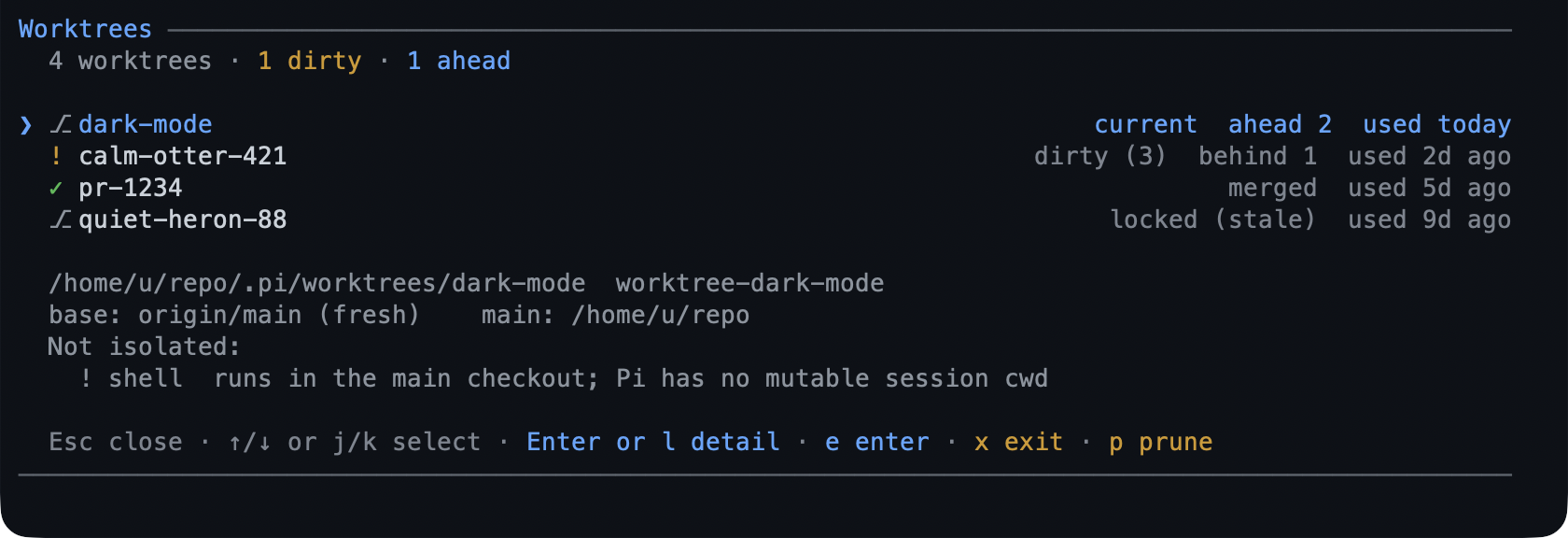
/worktree opens the list screen; /worktree enter <name>, /worktree exit, and
/worktree prune are the same actions from the terminal, and --worktree <name>
enters at session start. On the screen: j/k or arrows move, g/G jump to
the ends, Enter/l opens the detail, e enters, x exits, p prunes,
Esc/q closes.
Root-following. Relative paths resolve inside the worktree for the built-in
tools. A write or edit outside it is refused, a symlinked escape is refused, and
bash refuses git -C <main>, GIT_DIR=, GIT_WORK_TREE=, and cd outside the
worktree.
Locking. A worktree in use is locked, so another session’s prune cannot remove
it, and enter refuses one whose lock belongs to a live session — by name and by
path alike — rather than reopening or resetting it underneath that session. A lock
whose owner is gone is taken over. That lock is held by a worktree the session
created or took over; entering an unlocked checkout by path does not lock it. A
clean, unused worktree older than pruneAfterDays is eligible; everything else is
kept and named.
Child sessions. A pi started from inside a session binds to the same
worktree, read-only for the lifecycle, so a delegated run cannot exit or prune
it behind your back.
Limits
- The guard is best-effort at the shell level: a shell you run yourself (
!) is not re-rooted, and substitution,eval, andsh -care covered only withguard.blockUnparsableCommandson. powershellis refused while isolated rather than parsed; withguard.blockPowershell: falseit is allowed and unguarded, and/worktreereports that gap.- The tool is unavailable while planning: plan mode hides the whole tool, and
/worktreestill reads the inventory. - It is not a branch manager: no rename, rebase, merge, or push.
- If another extension owns
bash, setskipOverridesand that tool runs in the main checkout, unguarded for relative paths.
Settings
| Key | Default | What it does |
|---|---|---|
onExit |
"ask" |
What exit does by default: ask, always keep, or always remove. |
dir |
".pi/worktrees" |
Where managed worktrees live, under the repository root. |
baseRef |
"fresh" |
Branch a new worktree starts from: the fetched default branch, or local HEAD. |
include |
[] |
Gitignored files copied in, when .worktreeinclude is absent. |
pruneAfterDays |
7 |
Age after which prune may remove a clean, unused worktree. |
The rest — branchPrefix, fetchRemote, fetchTimeoutMs, skipOverrides, and
the six guard.* switches — are in
configuration. To switch the
extension off, toggle worktree in /bytefly; the session then works in the
main checkout.
Learn more
- Work in a worktree — the whole cycle.
rewind— snapshot before each prompt’s first change.session-bus— several sessions, one repository.