bytefly — the terminal, explained
bytefly is the visible layer of the pack: the startup header, the two-line
footer, the user-message nameplate, the rule that closes each turn, the frame every
tool block is drawn in, the working line on the composer, and the /bytefly
control center where extensions, skills, and settings are switched.
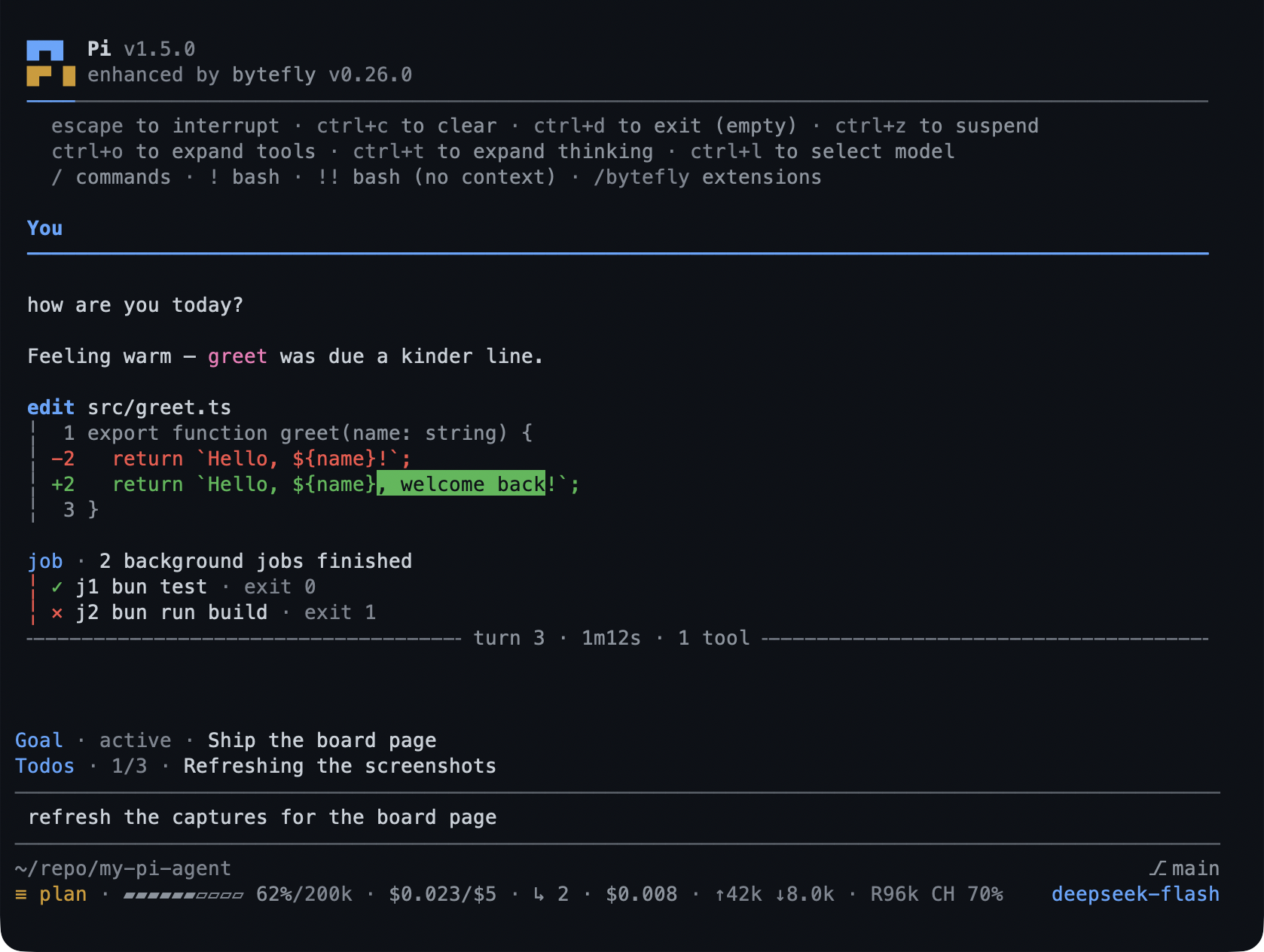
- One theme for the whole chrome —
bytefly-darkorbytefly-light, or the system’s preference. - The control center is the front door:
/byteflylists every extension and skill with a checkbox and, at most, one verdict word. - The footer tells you where you are: location, modes, alerts on one line; context, spend, tokens, and model on the other.
- It tells you what is missing:
run_doctorand/bytefly doctorreport what each enabled extension needs at runtime.
What you can do
| What you want | What to do |
|---|---|
| Open the control center | /bytefly |
| Switch an extension or skill on or off | Space on its row |
| Change a setting | /bytefly settings, then Space/Enter on the value |
| Pick a theme | the Theme row in Settings |
| Write a change for this project only | s switches Global ↔ Project |
| Drop a project override | x on the row |
| See only what needs attention | ! |
| Find a row | /, then type |
| Apply what you changed | R reloads |
| See what is missing | /bytefly doctor |
| Check for a newer package | /bytefly update |
| Turn OS notifications on | /bytefly settings → Notifications |
| Stop a session costing more than you want | the price.budget key |
Try it
/bytefly
The header names the worst problem it found, each tab carries its count, and the
body lists one row per resource: name, checkbox, status glyph, one verdict word,
and the focused row’s findings beside it. Tab moves between Extensions, Skills,
and Settings; ? shows every key.
Reference
Commands. /bytefly [extension] [refresh] opens Extensions (or one
extension’s full findings); /bytefly settings, /bytefly skills;
/bytefly doctor [extension] [refresh] prints the report; /bytefly prices names
anything the session could not price; /bytefly update re-runs the update check;
/bytefly upgrade installs what it found, behind a confirmation. Outside the TUI
each prints its listing instead of mounting the screen.
The tool. run_doctor takes extension and refresh and returns the same
report — a headline, each finding’s check, severity, detail, and optional
hint — for the model to reason about. It probes and changes nothing, so plan
mode allows it.
Keys. Space toggles or edits; Enter expands findings or opens the editor;
/ filters; ! shows what needs attention; s switches scope; x drops a
project override; u deletes a setting’s key so its default applies; J shows the
row’s whole bytefly.json section; r re-probes; R reloads; ? lists keys;
Esc closes (and clears a filter or editor first).
The surfaces. The header replaces Pi’s when quietStartup is on. The footer’s
left line carries location, mode, and alerts; the right carries a context gauge,
session spend, tokens, cache, and the model. The chip beside the location is the name
the team knows this session by — the bus label a join settled, the page’s seat after
/board, else Pi’s own session name — drawn only while team.teammates holds it, so
neither is ever drawn as itself. A project states its team and lead in bytefly.json’s
team section (the Lead and Teammates rows); one that names neither draws no chip,
and a /team join <label> puts the name it joined as on that list. Each turn closes
with a rule naming its number, duration, tools, and outcome. Every tool block leads
with its call line and hangs its result on the rail. Notices from any extension draw
at the transcript margin with a severity rail.
Updates. Once per session a check names the packages that are behind and marks
the header with this package’s marker and Pi’s own, replacing Pi’s startup update
blocks with the one themed notice. The result is cached in
~/.pi/agent/bytefly/update.json. PI_OFFLINE skips it, and nothing about the
session is sent: security says what leaves the machine.
Limits
- The chrome, the footer, the working line, and the control screen are interactive surfaces: a print, JSON, or RPC run gets the listings and the notices, not the frame.
- OS notifications need a channel the OS accepts; a TTY is required for the OSC methods, so a headless run falls back to an OS-level notification or none.
- The update check is a suggestion, never an automatic install.
run_doctorprobes enabled extensions; a disabled one is reported asenv disabledrather than probed.
Settings
The screen is the catalogue: the sixteen descriptors in screen order. Those are
the preferences a session changes: sixteen preferences under six headings —
Startup, Notifications, Session, Board, Team, Price — plus the fourteen
bytefly.json rows it can write. The list is capped at sixteen rows so the
screen fits a 30-row terminal, and the scope line reads
bytefly: Settings · Global · 16 settings. The sections behind this page are
chrome,
price,
notify, and
doctor.
To switch the extension off, toggle bytefly in /bytefly: Pi’s own header,
footer, and tool blocks take over, and every other extension keeps working.
Learn more
- Configuration keys — every key, with its default.
serve— the chip in the footer while a page is open.plan— theShift+Tabchord the editor binds.- Install —
/bytefly doctorafter a fresh install. - Troubleshooting — what a
doctorrow means when it saysenv disabled.