plan — decide before the model writes
Plan mode keeps the session read-only while the model investigates, then hands you a plan to approve. Nothing lands in your tree until you say yes.
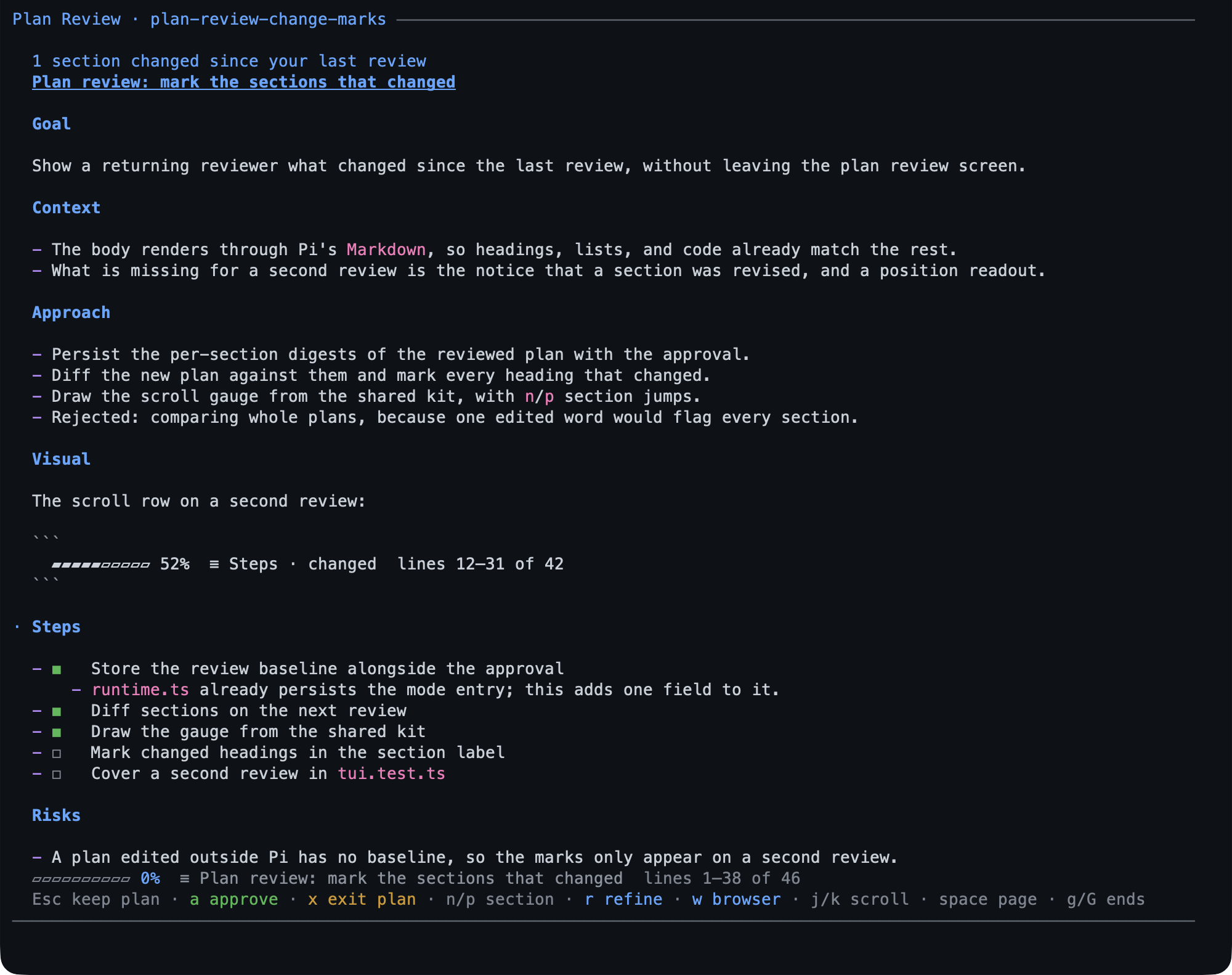
On that screen ◼ is a done step and ◻ a pending one, and after a
refinement a midline dot in the margin marks each section that changed.
- Use it for any change you would want to read before it lands.
/plan <task>starts one;Shift+Tabtoggles plan mode too.- Nothing in your tree is written until you approve — no file, no command, no commit. The one thing planning writes is the plan file itself, outside the checkout.
What you can do
| What you want | What to do |
|---|---|
| Start a task read-only | /plan add rate limiting to the public API |
| Switch plan mode on or off | /plan, or Shift+Tab with bytefly |
| Let the model start plan mode | it asks first; declining keeps write access |
| Read the plan | the review screen: n/p between sections, scroll keys for the body |
| Approve and start | a, then y — steps become your todo list |
| Ask for a change | r to refine, or comment in the browser |
| Review with a teammate | w for the browser page, then Share for a QR or link on this Wi-Fi |
| Leave without approving | Esc sends it back for another round; x leaves plan mode — the plan file stays either way |
| Read an older plan | /plan list, then Enter |
Try it
/plan add rate limiting to the public API
The model reads the code and the git history, never the write path. When it is
done it saves a plan under ~/.pi/agent/plans/<repo-key>/ and opens the review
screen; a approves it, r sends it back for a change.
plan exit 2026-10-09-1809-add-rate-limiting
✓ Plan approved
Approving ends plan mode, hands write access back, and puts the plan’s steps into
/todos — appended after any items already there, so the list is the one you
watch while the work runs. A full
walkthrough — refining, commenting, sharing with a teammate — is
Your first plan.
Reference
The plan tool has five actions; /plan is the command that drives it.
| Action | What it does |
|---|---|
enter |
take write access away, after asking you |
write |
save the plan file; pass the file it returned to refine it |
exit |
read the plan back and present it for approval |
steps |
tick a step in the file and in its todo item, in one call |
cancel |
leave plan mode, keeping any saved plan |
The plan file. ~/.pi/agent/plans/<repo-key>/<YYYY-MM-DD-HHmm>-<slug>.md — one
store per repository, shared by its worktrees. Each refinement keeps the previous
text beside it as a hidden file, five deep, so two rounds can be compared. The
plan is what the model follows: approving it seeds its steps into your todo list,
and finalizes a session goal that was only drafted, from the plan’s own Goal.
Approving a refined plan again replaces the items the earlier approval added that
nobody has started, so the list matches the plan you last read.
Review screen keys. a approve (y/Enter confirms), r refine inline,
Esc keep planning, x exit without approving, w open the browser review,
n/p jump sections. Ctrl+C interrupts without approving or rejecting
anything: plan mode stays on.
Browser review. w opens the same plan as a page: the title, the live comment
count, Approve & run, Save feedback, and Back to Pi. Hover a block and
press the + in its margin (a button named “Comment on this block”), or select text
to quote it, then Save feedback to send the
comments back. A comment-only review has no approve action.
Sharing. Share mints a link and QR for this Wi-Fi, one per teammate (at most eight), and each link binds the reviewer’s name on its first post; Revoke drops one. Only the machine that opened the review may approve, cancel, save, or share — a reviewer reads and comments.
Read-only means: the model keeps what reads and loses what writes. It can
still look at the repository’s git status and history; a write, an edit, and a shell
redirect are refused. Reads are not confined — the readers reach whatever the process
can, as the Limits below say — and a worktree’s guard.blockReadEscapes is where
that changes. A delegated agent runs with writing forced off.
Limits
- Read-only is a guard rail against accidents, not a sandbox — extensions share Pi’s permissions.
- A plan holds at most 50 steps and 256 KiB; a bigger one is refused rather than trimmed.
- Plan mode has no PowerShell on Windows: Git Bash is the shell, and it has to be installed.
- The browser review needs
serveand a local browser; a reviewer’s page is only reachable while its link is shared. - The plans directory is the only index — nothing deletes a plan for you.
Settings
Plan mode has no bytefly.json keys — the mode is the extension. To switch it
off, toggle plan in /bytefly; the tool, the command, and the mode go with it.
Learn more
- Your first plan — the walkthrough.
todo— where the steps land.- Security — what a shared review link is.