wechat — one conversation, on the phone
The bridge connects one WeChat account to one Pi session: a message from the chat starts a turn in the terminal, the answer streams back, and both sides share one transcript, one context, and one toolset. Only the account’s owner is answered.
- Started by hand.
/wechat loginscans and stores the account;/wechat startbinds the session and polls. A stored account on its own polls nothing. - One account, one session, bound through the session branch, so
/resumereopens it and/newstarts unbound. - Owner-only. Anyone else is refused, counted, and named once on the terminal.
- Plain chat text out. Markdown markers are flattened and a long answer is split into numbered parts.
What you can do
| What you want | What to do |
|---|---|
| Pair an account | /wechat login, then scan the QR |
| Start answering the chat | /wechat start |
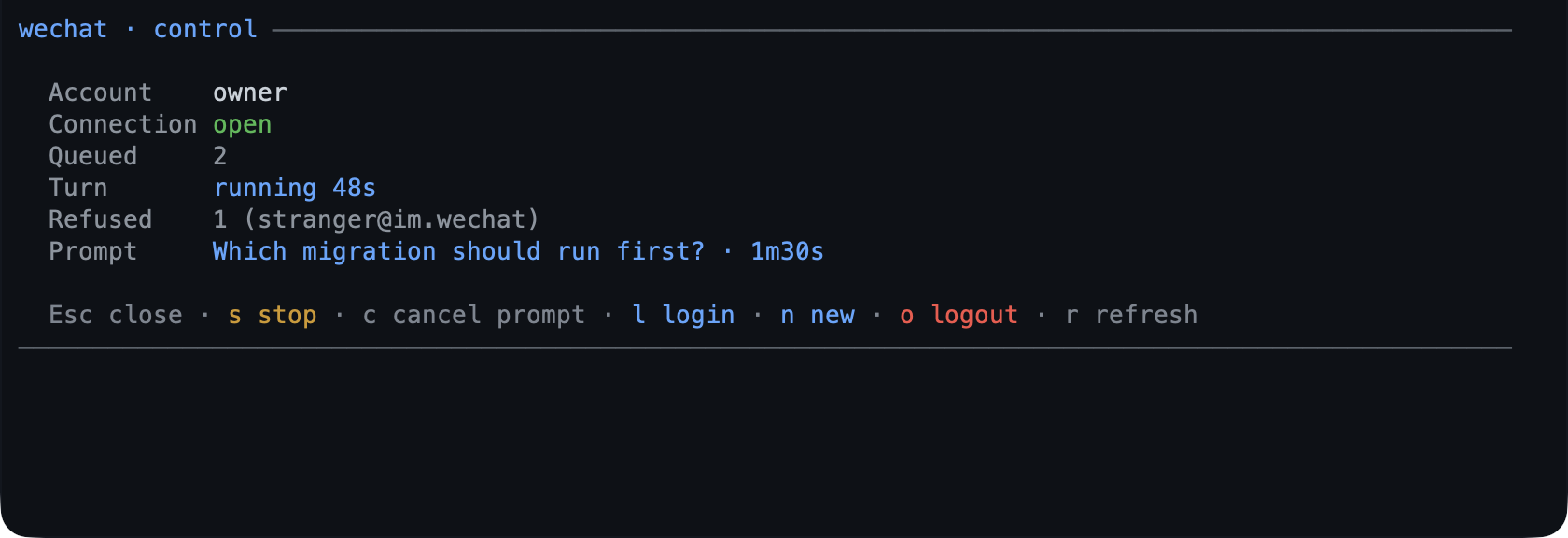
| See what the bridge is doing | /wechat — the control screen |
| Stop polling | /wechat stop |
| Answer a prompt from the phone | reply in the chat; the numbered options are the answer |
| Send a photo or a file to the session | send it in the chat |
| Ask for a message later | ask the model; it uses send_wechat |
| Read the last messages | /wechat history [n] |
| Diagnose a problem | /wechat doctor |
| Unpair | /wechat logout |
Try it
/wechat login
/wechat
start
Then message the account: “what is the state of the uploader task?” and the session answers in the chat. A full walkthrough is Chat with your session from WeChat.
Reference
Commands. /wechat opens the control screen (s stop the turn, c
withdraw the waiting prompt, t start/stop the bridge, l login, n new
session, o logout, r refresh, Esc close). Subcommands: start, stop,
login, logout, status, doctor, history [n], cancel, new, help.
A turn. An inbound message is a turn in the bound session: the text is
capped at maxInboundChars, an image arrives as image content, a file is saved
under the agent directory and referenced by path, and a voice note uses WeChat’s
own transcript. A replayed message id is answered once, remembered for an hour
across a reconnect.
Prompts from a turn. A question, a plan review, or a tool’s confirmation is
asked in the chat, numbered, and only that prompt receives the reply. A failed
wait is acknowledged once rather than silently dropped.
The tool. send_wechat takes exactly one of text (1–4000 characters),
image (a local path whose bytes sniff as an image), or file (a local path sent
as a document under its base name, so an image sent this way still arrives as a
document), and always messages the owner. A text send is refused while a turn with
the owner is in flight; an image or a file is allowed.
State. ~/.pi/agent/wechat/ holds credentials.json (mode 0600, one
account), state.json (cursor, owner, reply token, recently handled ids; mode
0600, because the reply token is a credential), media/ (inbound files, mode
0600, pruned after mediaRetentionDays), and poller.lock, which keeps a second
pi process from stealing the account’s messages.
Limits
- One account is polled by one session at a time; a second start is refused rather than competing.
- A token can expire: the chip reads
✆ wechat expired, and/wechat loginthen/wechat startis the fix. - Chat text is plain: no Markdown rendering on the phone, and replies over
maxReplyCharsare split. - Inbound media over
maxMediaBytesis skipped; inbound text overmaxInboundCharsis truncated with a marker. /wechat newis a terminal command — typing/newinto the chat reaches the agent as ordinary text.
Settings
| Key | Default | What it does |
|---|---|---|
maxReplyChars |
4000 |
Replies longer than this are split into numbered messages. |
typingIndicator |
true |
Show typing while a turn is generated. |
maxInboundChars |
8000 |
Inbound text longer than this is truncated. |
mediaRetentionDays |
7 |
Inbound files older than this are pruned; 0 keeps them. |
maxTurnsPerHour |
0 |
Caps turns per rolling hour; 0 is unlimited. |
The rest — maxMediaBytes, botAgent, channelVersion, and the CDN base — are
in configuration. To switch the
extension off, toggle wechat in /bytefly; the bridge closes and the chat
stops being answered.
Learn more
- Chat with your session from WeChat — the walkthrough.
plan— a plan review you can approve in the chat.question— the prompts that can reach the phone.- Security — what the stored account can reach.
- Troubleshooting — when the chip reads
✆ wechat expired.