Your first board
The board is a shared list of features for one repository. This walkthrough takes
one feature from an idea to done, through the two signatures it needs on the
way.
You need Pi and this package installed — see Install.
Two kinds of line appear below. What you type is a command — /board, or
/plan while a change is designed. What you say is a sentence, and the model
turns it into a board tool call: the board’s actions are the tool’s, so none of
this is a shell command.
Open the board
/board
The first session in a repository serves the page on 127.0.0.1; every other
session opens the same page instead of a second one. The command prints the
address, so a machine with no default browser still has the way in, and /board
status prints it again. The page is a view — it reads the cards and cannot
change them, so the terminal and the browser cannot disagree.
Two tabs: Board, the five lanes, and Team, the queue of decisions and the people holding cards. Opening a card shows its contract, the plan it is executed against, and its notes, newest first.
Put a feature on it
Put a feature on the board: the billing webhook accepts orders, under src/billing.
The model calls the tool’s add action with those three facts, and the card comes
back as one line:
#1 backlog · Billing webhook accepts orders
A new card lands in backlog — the pool nobody holds. paths are hints about
where the work lives; priority is high, normal, or low; type is
feature, bug, refactor, docs, test, or chore; breaking marks a change
an existing user must act on. edit links one card to another with dependsOn.
Take it and design it
Claim card 1 and design the change before writing anything.
The card is yours, in plan — and “yours” means this session’s. Ownership is a
session id, so a session that ends leaves a card another session can take back once
its record says it stopped, or that the lead reclaims at once; a reclaim keeps a
spot-check the reclaimer did not sign. A claim also names the next step: design the
change in plan mode, save the plan, then record what the card promises.
/plan add the webhook endpoint and its signature check
Approving the plan seeds your todo list and leaves plan mode. Next, record what
the card promises — goal, acceptance, scopeOut, and the plan file itself:
Record the contract for card 1 from the plan we just approved.
board({ action: "contract", card: "1", path: "<the path plan returned>",
  goal: "A retried delivery is accepted once",
  acceptance: "A duplicate event id returns 200 and writes nothing",
  scopeOut: "No new event types" })
path is the file plan action write returned — not one retyped from another
repository’s store. It must be in this repository’s plan store, and it must still
be there when the card moves to execute: a plan deleted after it was recorded
refuses the move.
plan and execute hold a limited number of cards: three in plan and five in
execute by default. A claim past either is refused and says how many are already
there, and to finish, block, or release one first.
Pass the two gates
A card cannot enter execute until its contract is approved, and cannot finish
until the work is spot-checked. Both signatures are the lead’s — team.lead,
lead by default — and the person at the keyboard is the other way in:
/board approve 1
board: #1 approved by you · told gavin
The clause after the sign names the owner the bus reached, or says it could not. Then the work itself starts:
board({ action: "move", card: "1", lane: "execute" })
A card that is not ready to execute can be parked instead. blocked waits on a
person, and the card records the one line it waits on — a decision, a dependency,
or a contract that is not written yet. Resuming it goes back to plan, or
straight to execute when it was already approved before it was parked.
Notes are how the card explains itself while it is worked:
Note on card 1 that the signature check covers the retry path, and that the fixture is in.
When the work is done, the lead — or you — looks at it once:
/board review 1
board: #1 reviewed by you
Then the card moves to done. A session never signs a card it holds: it releases
the card before signing. You can sign your own, because the slash commands above
write the person’s signature, not the session’s. Every sign tells the owner over
the session bus, so the person waiting knows the lane opened.
Look at it from the page
/board stays live: a card a session claimed, moved, or noted shows up without a
reload. Filter the cards, fold done away, or open the Team tab to see who
is live, quiet, or gone — and which cards are waiting on a decision.
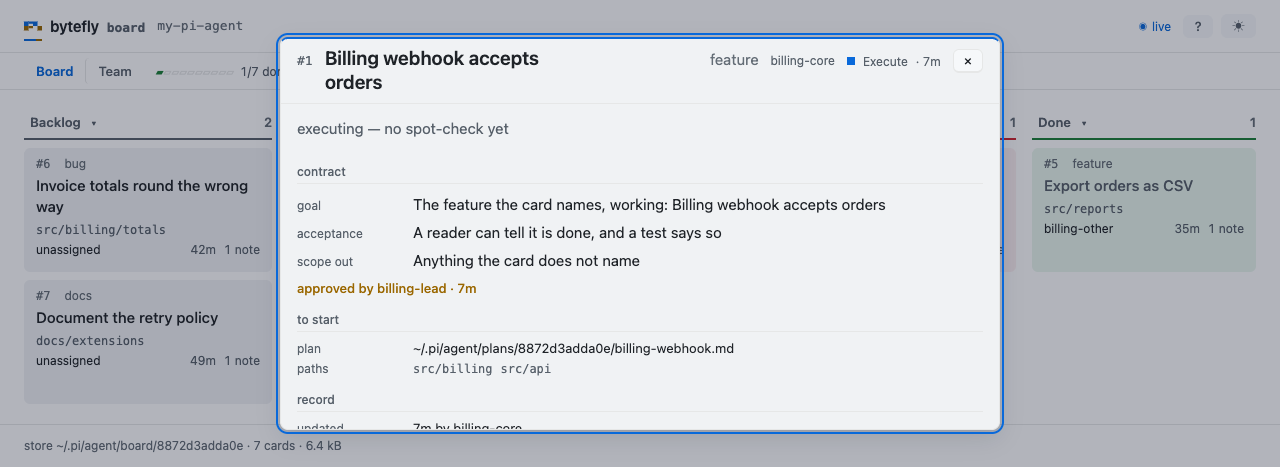
One card opened: the contract it promises, the plan it is executed against, and the notes that explain it.
Set finished work aside
/board archive
done cards leave the board for an archive that keeps their notes and plan. It is
one way: nothing un-archives a card, so sweep when the history is ready to leave.
A finished card an open card still waits on stays where it is, and the command
says which.
Where to go next
board— the lanes, the actions, and the limits.team— handing a card to a peer, and the round.plan— the plan the contract points at.session-bus— the bus every sign travels on.