todo — keep the task list in view
The model keeps a task list for whatever it is working on, and you can see it above the editor at any moment:
Todos · 1/3 · Writing the retry tests
- Use it for work longer than a couple of steps.
- You don’t drive it — the model rewrites the list; ask for a change in words.
/todosshows the whole list whenever you want to look.
What you can do
| What you want | What to do |
|---|---|
| See how far the work has got | the line above the editor: how many items are done, then the active one |
| Read the plan the model is following | /todos |
| Change the plan | say so in your next message; the model rewrites the list in one step |
See the list again after /resume or /tree |
nothing — it belongs to the conversation, and an earlier point keeps its own list |
| Clear the rail once everything is done | nothing — it hides itself, unless you turned that off |
Try it
Ask for a job with steps, then watch the rail:
Refactor the uploader to retry three times, and add tests.
/todos
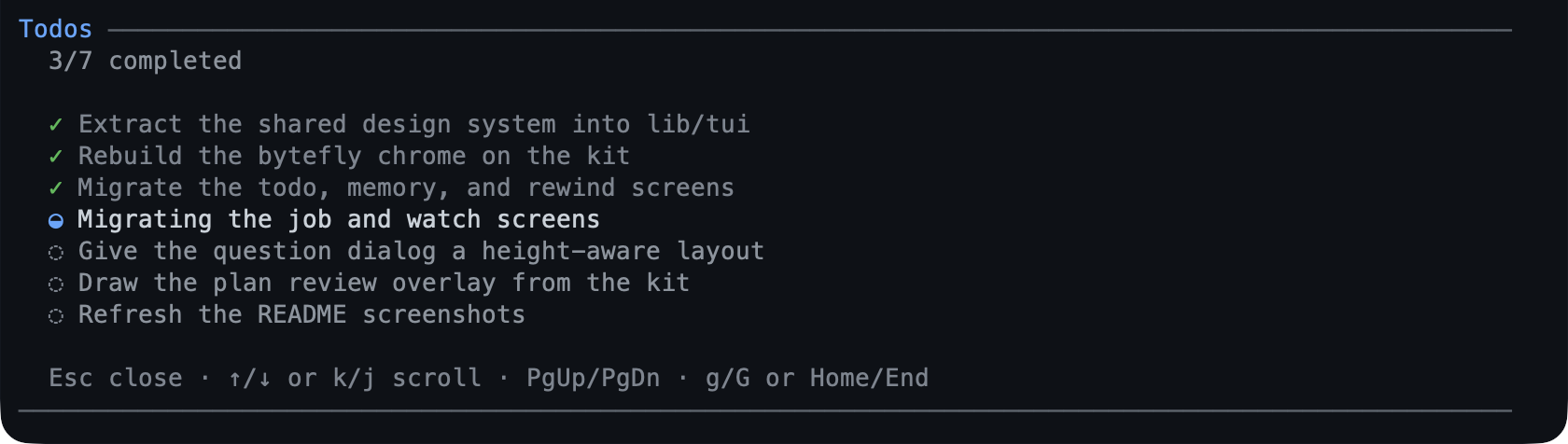
Each row is one line: ✓ done, ◒ in progress, ◌ pending. The screen keeps the
order the model wrote it in, so it reads as the plan rather than as history.
Track your first task walks a whole job through it.
Reference
The model resends the complete list on every call — an empty list clears it — so a change you ask for lands in one step rather than as a series of edits. A call that breaks a rule is refused with the previous list intact, so the model retries instead of half-applying:
- one item in progress at a time, and the active row says what is happening;
- at most 50 items, at most 500 characters each;
- non-empty, unique text;
- each row is squeezed to one line, so a long task never breaks the rail.
The list is session state, not a file: a new session starts empty, and
/resume or /tree restores the list for that point in history.
On the /todos screen: ↑/↓ or j/k scroll one row, PgUp/PgDn page,
g/G jump to the ends, and Esc closes it. The rail and the screen need the
interactive terminal; a scripted run gets the tool result only.
Limits
- No priorities, due dates, or dependencies — a flat checklist.
- There is no checkbox you can tick yourself: ask for the change in words.
- The list is per session: nothing is shared between sessions or machines.
- The list can lag by a turn. Say “update the todos” and the model rewrites it; the extension also sends one reminder when substantial work lands without an update.
- A finished list stays readable in
/todosuntil the model changes it.
Settings
| Key | Default | What it does |
|---|---|---|
hideWhenComplete |
true |
Hide the rail once every item is completed. |
It is a bytefly.json edit — the settings screen does not list it; the
resolution rules are in
configuration. To switch the
extension off entirely, toggle todo in /bytefly.
Learn more
- Track your first task — the walkthrough.
goal— the other line above the editor.plan— a plan you approve before work starts.