job — run long commands in the background
A build, a test suite, a dev server, a watcher: job starts it in the background
and keeps the turn free. The command keeps running across tool calls — poll it,
read its log, wait for it, or kill it.
- Started immediately, in the background, with stdout and stderr streamed to a log that rotates instead of filling the disk.
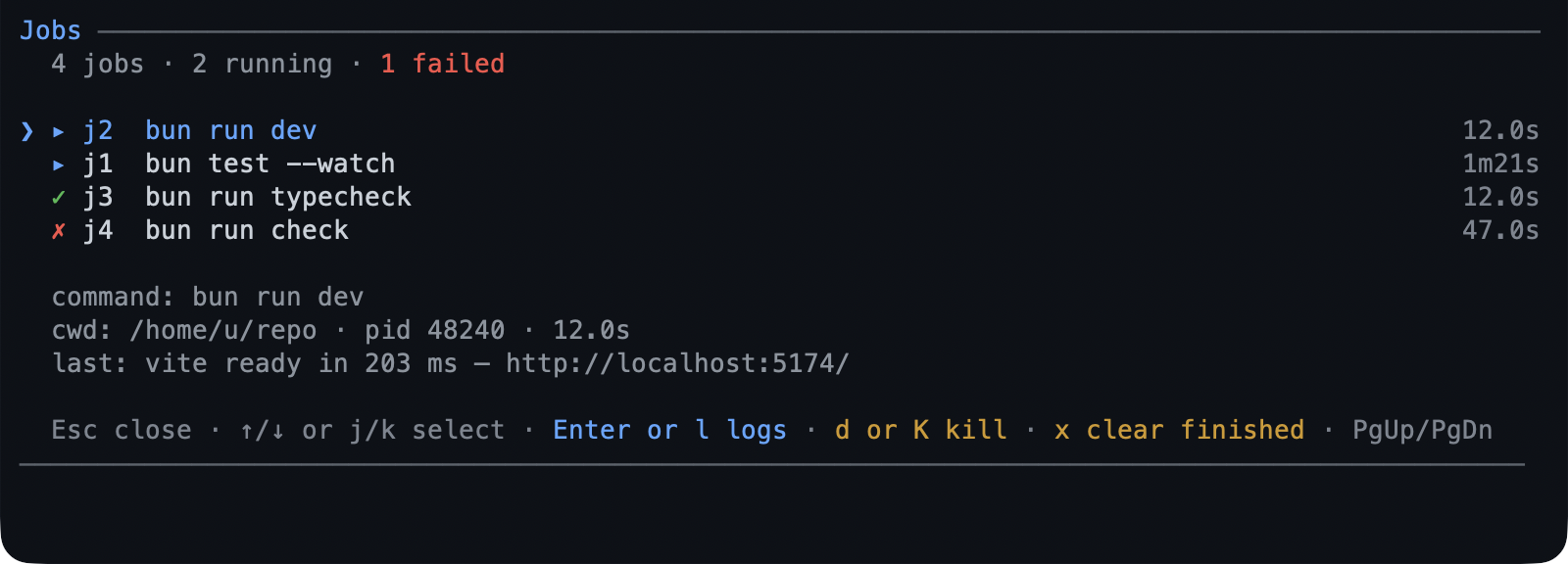
/jobsis the one screen: running jobs first, then recent ones, each row showing its id, a command label, and how long it has run, with the focused row adding the directory, outcome, and last output line.- A finish can reach you: reported at the next turn, or — with
wake— it raises a turn as soon as the agent is idle. detachedsurvives the session on POSIX; Windows refuses it rather than pretending.
What you can do
| What you want | What to do |
|---|---|
| Run something in the background | ask for it: “run the test suite in the background” |
| See what is running | /jobs |
| Read a job’s output | Enter on the screen, or ask for the log tail |
| Wait for one to finish | ask it to wait, with a timeout if you care |
| Kill one | d on the screen (it asks), or ask for a kill |
| Feed a running program | a job started with stdin; send writes a line or a keystroke |
| Get told when it finishes | ask for a wake, or set wakeOnFinish |
| Clear finished jobs | x on the screen |
| Keep it after the session ends | start it detached (POSIX) |
Try it
Run the full test suite in the background and tell me when it fails.
Then:
/jobs
↑/↓ or j/k select, Enter/l opens the log (g/G jump, Esc
returns), d kills after a y/N prompt, x clears finished jobs after one,
and Esc closes the list.
Run long work in the background walks a job,
its screen, and the watcher that reads the same log.
Reference
Actions. One tool, shaped by action: start, list, status, logs,
wait, send, kill, clear. start takes the command, a timeoutMs to cap
its wall clock, stdin: true to drive it later, wake to wake the agent when it
finishes, and detached to outlive the session. kill sends SIGTERM, then
SIGKILL after killGraceMs.
The screen. Running jobs first, then recent ones, with a summary line counting
running, failed, and peer jobs. Another session’s job is shown tagged peer and
its log opens, but it cannot be killed or cleared from here.
Exit codes. A job is wrapped in a shell EXIT trap that records $?, so a job
reattached after its session died still reports its real code. exec-style
commands and Windows jobs settle as unknown instead.
Where they live. ~/.pi/agent/jobs/<project>/ holds the registry and one log
per job, which is also why a job reattached after a session restart still has its
output.
Logs. maxLogLines bounds what logs returns; maxLogBytes rotates a
segment to <id>.log.1. A detached job’s own redirection cannot be rotated, so
its log grows until you clear it.
Limits
- stdin is a pipe, not a terminal: line-oriented programs work, full-screen ones do not; a reattached or peer job cannot be fed.
- Output splits on newlines only, so a progress bar that rewrites one line stays one line.
- A peer session’s finished job waits for that session to clear it.
- Windows cannot detach a job, and a job there may settle as
unknown. - The registry keeps
maxJobsfinished records; older ones are dropped.
Settings
| Key | Default | What it does |
|---|---|---|
showStatus |
true |
Show the ▸ N / ✗ N footer chips. |
wakeOnFinish |
false |
Wake the agent when any job finishes. |
maxJobs |
20 |
Finished records kept before the oldest go. |
maxLogBytes |
8388608 |
Bytes per log segment before it rotates. |
killGraceMs |
5000 |
Grace before SIGTERM escalates to SIGKILL. |
The rest — enabled, detachedByDefault, maxLogLines, repaintMs,
sessionTtlMs, and registryDir — are in
configuration. To switch the
extension off, toggle job in /bytefly.
Learn more
- Run long work in the background — the walkthrough.
watch— react to a line, not a whole job.subagent— hand a long task to another agent.